Showing posts with label Aftertouch. Show all posts

Thursday, March 13, 2014

Polysix - Sharing my Arduino Code

As many of you know, I made some pretty substantial modifications to my Korg Polysix.  One of the biggest changes was to replace the keybed to enable aftertouch.  To make this happen, I had to replace the Polysix's Key Assigner with an Arduino.  It was a lot of work, but once I made the core hardware modifications, I found that I was able to add lots of features to the Polysix, such as: aftertouch and portamento, more interesting detuning for unison mode, a poly-unison mode, a Moog-like single-trigger mode, and a sustain pedal.  All of these modifications were effected through software changes on the Arduino.

Since I have made those modifications, I have had some people ask if I could share the software.  At first I declined, because I was embarrassed of the poor quality of the code.  I also didn't really know how to share it.  Then, I learned how to use GitHub.  So, I at least know how to share my code now.  All I have to do is get over my embarrassment.  Well, here we go...


If you want to look at some nasty code for how to replace the Polysix Key Assigner using an Arduino, you can find my GitHub repository at: https://github.com/chipaudette/ArduinoPolySix.

Yes, my code is tortured and very difficult to follow.  But, that's what happens when you're just learning how to do this stuff.  Sorry.  If I were to re-write it from scratch it would look a lot different...but this is what I have now.  Maybe you'll find something useful.

Thanks for reading!

Saturday, April 27, 2013

Polysix - Adding "Detune"

After adding the hardware and software to implement aftertouch vibrato and portamento, I realized that I could command the Polysix to do all sorts of arbitrary pitch-manipulation effects.  With just a little bit of additional software, I could do pitch bends, pitch wobbles, pitch slides (hence the portamento), pitch transposition, or...wait for it...pitch detuning.  I love the detuned unison sound on my Mono/Poly and now I can get it on my Polysix!


It should be noted that the Polysix already has a little detuning purposely built into its Unison mode.  The circuit below is on the KLM-366 PCB and is only active in Unison mode.  Via voltage dividers (R120-R122 per voice combined with R116 for all voices), this circuit generates a small voltage that is used to shift the pitch of each voice to be a little sharp or a little flat.

Polysix's Built-in Detuning Circuit for the Unison Mode
By looking at this piece of the schematic, it looks like this circuit leaves Voices 1 and 6 unchanged.  It appears to shift Voices 2-4 up or down by between 16 and 33 mV.  The schematic says that the pitch scale is 5V/oct at this point, so the per-voice pitch detuning is about 4-8 cents (4-8% of one half step).  While that's enough to give a nice little swirl to the Unison mode, it doesn't give that meaty, fat detuned sound that has become popular in some electronic dance music styles.  I intend to change that.

In terms of approach, one could simply modify the existing circuit.  By replacing R116 with a bigger resistor (say 400-600 ohms), the detuning would get much more intense.  It would still be a fixed amount of detuning, but it would be a very easy modification.  The down side is that it is not adjustable (unless you wired in a potentiometer) and that it only applies to Unison mode -- it is not usable by Chord Memory mode.

Since I already have my Polysix modified with an Arduino and a digital-to-analog converter (DAC), I can do arbitrary pitch shifts and pitch bends on a per voice basis in any of the Polysix's modes of operation.  That's a lot of pitch-mangling power.  So, I wrote a little bit of software that, when I commanded the Arduino to effect "Detuned Mode", it would command a slight pitch shift to each of the Polysix's voices.  How much pitch shift per voice?

Well, following from the Polysix's built-in detune, I left two of the voices at normal pitch and bent the other voices in pairs (one up, one down) to different degrees.  The overall scale factor for the detuning I left as a variable that I could adjust on-the-fly so that I could control how much detuning I wanted.

Spectrogram of Output of Polysix While Adjusting the Amount of Detuning
For my user interface, I've temporarily mapped "Detune Activate" to my Polysix's arpeggiator button.  Pressing the arp button activates or deactivates the detuning.  Then, I can control the amount of detuning by holding down the arpeggiator button and turning the arpeggiator's "speed" knob.  My Arduino sees the button being held and sees the knob being turned and interprets that as a command to adjust the detuning.  It works great!  The spectrogram above really shows how the voices spread apart as the amount of detuning is increased.

How does it sound?  Well, the video is a demo of the audio coming out of my modified Polysix.  At the very beginning, you hear me load up the six voices playing the same note.  I lock in the six voices using the Chord Memory button. You hear that the voices are in pretty good unison.  Then you hear me kick in the detuning.  I like it a lot.  Yes.  A lot.

Thanks for reading!

More Info: Choosing my Polysix's default detuning amount based on the Mono/Poly
More Info: Disabling the Polysix's built-in detuning to improve the control over the detuning amount.
Update: I shared my Arduino code here.

Tuesday, April 9, 2013

Polysix - Aftertouch Curves

After the success of simply getting the aftertouch system working on my Korg Polysix, now comes the effort to tune the response of the system so that the *feel* of the aftertouch is just right.  The feel of the aftertouch has a bunch of components: the physical resistance of the keybed, the force needed to initiate the aftertouch, and the sensitivity of the aftertouch to increasing pressure.  This last bit is defined by the "response curve", and it's the creation of my own response curve that I'm focusing on today.

Gathering Aftertouch Data via my Arduino Mega (the Blue Board in the Back)
The first step in tuning the aftertouch response is to be clear how aftertouch works in my system.  My new Fatar keybed (bought from Keyparts UK) has the aftertouch pressure sensor built-in.  This analog sensor is a long force sensitive resistor whose resistance drops when pressure is applied.  The sensor strip is plugged into the keybed scanning electronics (also from Keyparts UK).  The electronics include some sort of circuit that senses the resistance of the strip and generates a MIDI aftertouch message as pressure is applied.  The MIDI message includes a data field who's value is increases with increasing pressure.  What this sensor looks like, or how they convert their measured value into a MIDI data value, I'm not sure...but it has a strong effect on how the aftertouch feels.  It is especially important for defining the force required for the onset of the aftertouch effect.  Currently, I have no control over this part of the aftertouch response.

Once the electronics generate a MIDI aftertouch message, it is conveyed to my Arduino Mega via the Arduino's built-in TX/RX serial connections.  When the Arduino receives an aftertouch command, it induces pitch changes (vibrato) in the Polysix.  The magnitude of the vibrato is proportional to data value in the aftertouch MIDI message.  So, more key pressure generates a MIDI message with a bigger data value, which causes my system to put more vibrato on the pitch.  Easy.  But to be musically useful, the amount of vibrato needs to be controllable via the amount of force that I put on the keybed (not just ON or OFF), which means that the scaling between key force and vibrato response needs to be just right.

So, to get that scaling "just right", we need to get quantitative.  I need to record the actual aftertouch values generated by my system as I press on the keys.  Since I've got the Arduino in the system, I'm able to easily echo the MIDI aftertouch messages through the Arduino to my PC for logging and analysis.  Below is a plot of the aftertouch data values logged by my PC for three key presses.


As you can see, the aftertouch values span 0-127, which the full range allowed in the 7-bit space afforded by aftertouch MIDI message.  The next thing to notice how steep the curves are at the beginning and end of the each key press.  Being very steep means that my vibrato comes on strongly and suddenly.  My goal is to smooth that out so that I can have better control over more subtle amounts of aftertouch-induced vibrato.

My approach is to take the in-coming aftertouch value and to re-map it to a new value using my own aftertouch response curve.  The new response curve will be shaped to reduce the slope of the onset of the aftertouch.  Since I don't have the ability to set the response curve inside the keyscanning electronics (yet), I will have to implement the new response curve in the Arduino.  Fine.  But what response curve should I use?  I don't know.  We'll have to try some out.

Below is one of the first candidate curves that I tried.  It is simply two linear segments stitched together.  For small aftertouch values (like the onset), the slope is reduced so that the onset is more gentle.  This sounds like what I want.  The plot on the right shows the data from one of the key presses from the graph above.  The blue curve is the raw data.  The green curve is the re-mapped data.  Note that, yes, the steep onset is reduced, but I don't like that flat plateau that follows the onset.  That plateau will feel like a dead spot where nothing happens.  That isn't good.  Pressing harder should give a stronger response.  This is a Fail.


My next attempt at a new response curve was just a shot in the dark.  I tried an exponentially shaped curve because I knew that it would have a gentle slope at the beginning of the response and that it would smoothly transition up to its steeper portion (see the left-hand plot below).  Sounds good, right?  Unfortunately, as you can see in the right-hand plot, it's onset is far too gentle and its output stays low for far too long.  Then, finally, towards the climax of the keypress event (when the force is highest), the response suddenly leaps relatively from a low value up to the maximum allowed value.  Bad.  Again, Fail.


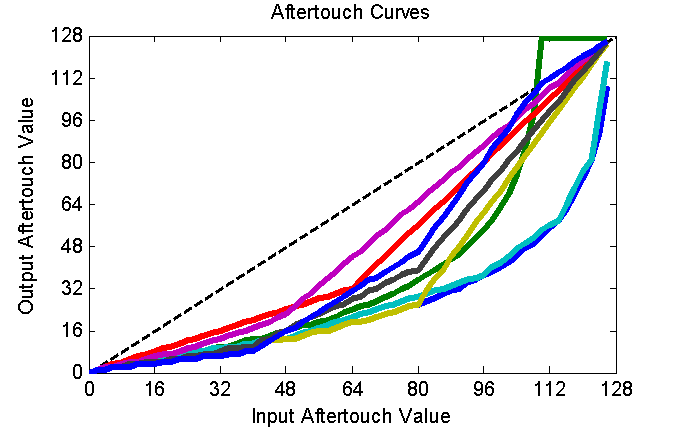
I then tried a whole bunch of other curves.  Lots and lots.  You can see many of them plotted together in the figure below.  Some of them looked decent enough on paper to be worth trying on the Arduino.  So, I coded them up as a simple look-up table and gave them a test drive.


After trying a bunch of curves, and after iterating the details of the most promising candidate, I finally converged to the curve below -- a curve made up of 4 linear segments.  As you can see in the right-hand plot, the new onset and release seen in the green curve is very smooth.  It gives me the best control (that I could find through this guess-try-and-tweak method) over both subtle and strong amounts of vibrato.  It feels pretty darned good!


My remaining criticism with the response of my aftertouch is that it takes too much force to get the aftertouch started.  Sadly, I have no control over when the aftertouch starts -- the start of the aftertouch is entirely set by when the keyscanning electronics decide to start generating MIDI aftertouch messages.  Don't get me wrong, I think that the folks over at Keyparts UK set a very good general-purpose aftertouch threshold into their keyscanning electronics.  I just think that *I* like my aftertouch to start with far less force than most other folks.  I like it to start with a mere feather of a force...an amount that would drive other folks crazy.

To address this "problem", I'm thinking that there's probably a configuration setting in the keyscanning electronics that'll let me adjust the aftertouch threshold.  The electronics are amazingly configurable and under continued development.  I think that it's time for me to dive in and figure it out.  Fun!

Next Step: Tuning the Portamento

Tuesday, April 2, 2013

Polysix - Re-Using the Arp Clock for the Aftertouch LFO

In a previous post, I demonstrated aftertouch in my Korg Polysix.  The aftertouch is used add vibrato -- an oscillating modulation of the pitch of the current note -- which is very similar to the effect of the mod wheel that is already built-in to the Polysix.  In fact, I originally planned on having the aftertouch utilize the same modulation generator (LFO) as used by the mod wheel.  But then I thought that it might be better to have the vibrato clocked by its own LFO thereby leaving the Polysix's built-in modulation generator free to do other effects like filter sweeps or tremolo.  Doing a vibrato-dedicated LFO in software in the Arduino is trivial, but how do I control its speed?  Is there a control on the front of the Polysix that I can re-purpose for controlling the vibrato LFO's speed?  Well, there is.  I chose to re-purposed the Arpeggiator's "Speed" knob.  Here's the story of how I did it.  (Note that I go into some gory details here, so you might just want to browse the pictures below and then go watch some funny cat videos.  I recommend this one).


The key limitation in this hack is that I do not (yet) want to add any more knobs or switches to my Polysix.  I would like to re-purpose one of the built-in knobs or switches.  This is made more challenging in that, because I have so far only replaced the Key Assigner microprocessor, I only have access to the knobs and switches that are serviced by the Key Assigner.  Most of the knobs and switches are actually serviced by the main processor in the Polysix, not the Key Assigner.  The only controls that serviced by the Key Assigner are (as shown in the picture below) the Arpeggiator controls and the Key Assign Mode button.  You know, that Arpeggiator "Speed" knob looks like it could be pretty useful...


One convenient property of the Arpeggiator controls is that they serve no purpose when the Arpeggiator is off.  Conversely, when the Arpeggiator is on, one is not likely to care about applying aftertouch vibrato.  So, we have a nice opportunity here to use the Arpeggiator controls for the Arpeggiator when in Arp mode, and an opportunity to re-use the Arpeggiator controls for another purpose when in normal mode.  Sounds good!

In the Arpeggiator controls, we see that we have a nice knob named "Speed".  It even has a blinky LED to indicate its current speed.   This seems like a perfect control for me to use to control my aftertouch vibrato.  How do we go about doing it?  Well, first we need to learn about what that knob is attached to, which means that we need to learn about the Polysix's Arpeggiator clock...

The Arp's "Speed" knob is wired into the circuit shown in the schematic below.  It is a circuit for generating clock pulses.  These pulses are used to drive the Arpeggiator when the synth is in Arpeggiator mode.  The "Speed" knob is wired into this circuit such that it changes the rate of these pulses so that the Arpeggiator goes faster or slower as desired.  It looks like the best way for me to re-use the Arp's "Speed" knob is to simply listen to the "ACKI" line and respond to changes in the rate of the pulses.


Looking at other parts of the schematic (KLM-366), the ACKI line is brought back to the Key Assigner's 8049 microprocessor.  Since I just replaced this microprocessor with my Arduino, it means that I have easy access to this signal.  I just need to figure out the best way to get the Arduino to respond to the arrival of these short pulses.  Using one of the Arduino's interrupt pins is clearly the best solution. If you're not familiar with interrupt pins, here's the idea:

Some of the Arduino's pins are special -- they can be configured so that they are always being monitored for changes, even while the Arduino is doing its other work.  Whenever a change is detected on one of these pins, the Arduino interrupts what it was doing and executes a special piece of code that you write called an "interrupt service routine" (ISR).  In the ISR, I would write the logic to measuring the timing of received pulses so that, back in the main part of the code, the vibrato LFO can adjust its speed.  There are three steps to implementing this:  (1) connect the ACKI line  to a one of the interrupt-enabled pins on my Arduino, (2) write an ISR, and (3) "attach" the ISR to the interrupt pin.  Let's go!

Step 1, Connect ACKI to an Interrupt Pin:  The Arduino's interrupt pins are discussed on this page.  I'm using an Arduino Mega and you'll see that there are six pins that are capable of being interrupt pins.  For no particular reason, I chose to go with Interrupt 4, which means that I should use pin 19.  So I brought a wire from the ACKI line in my Polysix (from the now-empty 8049 socket) out to pin 19 on my Arduino Mega.

Step 2, Write the ISR:.  The ISR is a software routine will be called whenever a pulse is received from the Arp clock via the ACKI line.  After thinking about how to handle the timing of the vibrato's software LFO, I've decided that the ISR only needs to measure the time that has passed between the previous Arp clock pulse and the newly-receive Arp clock pulse.  Once I know the time between pulses, I can adjust my software LFO in the Arduino so that it'll cycle at the same rate.  Below is my ISR code for measuring the time between pulses.  The Arduino executes it whenever a new pulse is detected on my interrupt pin.

typedef unsigned long micros_t;         //data type returned by micros();
volatile micros_t previous_ARP_micros = 0;     //don't forget "volatile"!
volatile micros_t ARP_period_micros = 1000000; //don't forget "volatile"!

void measureInterruptTiming(void)
{
  //get the current time
  micros_t current_ARP_micros = micros();  

  //compute how much time has passed since the last pulse

  ARP_period_micros = current_ARP_micros - previous_ARP_micros;

  //save the current time for use when the next pulse arrives

  previous_ARP_micros= current_ARP_micros;
}

Step 3, Attach the ISR to the Interrupt Pin:  With the ISR written, now I need to tell the Arduino to execute this code whenever it detects a change on my particular interrupt pin.  This is called "attaching" the interrupt.  Following the documentation in the Arduino link above, I add this command to my void setup() routine:

attachInterrupt(4, measureInterruptTiming, RISING);

And we're done!  The result of this process is that the user (me!) can turn the "Speed" knob on the front of my keyboard, which changes the rate of pulses from the Arp clock, which is noticed by the Arduino via Interrupt #4 (aka, Pin 19), which causes it to run my ISR routine, which writes the time between pulses to a global variable, which is then acted upon in the main part of the Arduino software (not in the ISR) to adjust the rate of the vibrato.  Stated more succinctly, turning the "Speed" knob will now change the speed of my aftertouch vibrato.  And I did it without needing to cut any new holes in my Polysix for new knobs or buttons.  Mission accomplished.  Thank you Arduino!  Thank you Polysix!  Thank you reader!

Next Step: Mounting the Arduino in my Polysix
Next Step: With this success, I also use the Arp Speed knob to control detuning in my Polysix

Thursday, March 28, 2013

Polysix - Aftertouch and Portamento Demo

This last week has been an exciting time for my pursuit of adding aftertouch to my Korg Polysix.  As you know by now, I *really* want aftertouch vibrato on my Polysix...so a while back, I ordered a bunch of parts and dived in. I've been posting about my progress.  In my last post, I described the electronics elements that I used to implement the arbitrary pitch bending that would allow for my aftertouch-driven vibrato.  As a bonus, having arbitrary pitch control also enabled me to add portamento to my Polysix, which is another effect that I absolutely love.  So, without further ado, now that I've put her back together, here's my first demo of what she can do...


How did I make this happen?  Well, the block diagram below shows the elements.  I bought an aftertouch-enabled Fatar keybed from Keyparts UK.  I bought their custom keyscanner, too, which scans the keybed and generates MIDI messages.  I then use an Arduino Mega to parse the MIDI messages and to drive the Polysix's electronics.  It interfaces with the Polysix by replacing the Intel 8049 microprocessor that is at the heart of the Polysix's "Key Assigner" circuit.  This this digital interface, I can control what note they Polysix is sounding.  To get the arbitrary pitch bending for the aftertouch vibrato and for the portamento, I generate an analog pitch control voltage (CV) using a digital-to-analog converter (DAC) from Adafruit.  I inject that signal at a pitch CV summing node that it already built into the Polysix.  After writing a bunch of code to run on the Arduino and after debugging these hardware elements, she works pretty well!

How I'm Implementing Aftertouch and Portamento
For a user interface, I'll eventually need to add some switches and knobs to the front panel of the Polysix.  For the moment, though, I've chosen to re-purpose the knob and switches that are supposed to be used to control the arpeggiator.  Since these particular elements are scanned by the Polysix's Key Assigner, and since I just replaced the Key Assigner with my Arduino, I now have total control over these particular user interface elements...so, I can make them do whatever I want.  For the moment, I'm going to use them for my aftertouch and portamento.

As you can see in the image below, I chose to make the arpeggiator "Speed" knob control my software LFO, which is driving my aftertouch vibrato.  The blinking of the LED still works to show the speed of my aftertouch vibrato!  I then use the arpeggiator "Range" switch to set the sensitivity of the aftertouch response.  Portamento is activated or deactivated using the "Latch" switch, while the amount of portamento is set using the "Arpeggiator Mode" switch.  Now I'm not saying that this is an intuitive user interface, but it sure is nice being able to use these elements to control my new features without having to cut into my Polysix panel.

Re-purposing the Arpeggiator Controls for Use with my Aftertouch Vibrato and my Portamento
So, I'm pretty excited about how she's working.  There are certainly more tweaks and adjustments to make, but the basics are all in place.  In fact, now that it's working, I don't seem to spend any time tweaking the electronics anymore...I just spend all my time playing.  I guess that's kinda the point, though.  :)

More updates later...when I get tired of playing!

Update: Here's more info on re-using the arpeggiator "Speed" knob to control the aftertouch vibrato speed
Update: Mounting the Arduino in the Polysix
Update: Tuning the Aftertouch Response Curves
Update: Tuning the Portamento Based on the Mono/Poly
Update: Adding detuning to the Polysix
Update: Added a sustain pedal to the Polysix
Update: I shared my Arduino code here
Update: I added Velocity Sensitivity to my Polysix.

Saturday, March 23, 2013

Polysix - Arduino and DAC to Bend the Pitch

Earlier in the week, I'd made good progress on getting the new keybed and keyscanner into shape so that it could drive my Korg Polysix via an Arduino.  While it was exciting to simply get the keybed to work in the Polysix, that was not really my goal.  My real goal is to use the new keybed to enable aftertouch (and eventually velocity sensitivity) in my Polysix.  Now is the time when I make the bits between the Arduino and the Polysix so that the aftertouch actually does something.  This is where I make the Arduino have arbitrary control over the pitch of the Polysix's voices.

Creation is a Messy Process!
The first step is to make sure that I have a clear idea of what my approach is going to be for the aftertouch to command pitch on the Polysix.  Below is a block diagram showing the major components that I settled on and how they connect.

Here's How I Am Implementing Aftertouch
Listening for MIDI Aftertouch:  User, of course, is interacting with the keyboard via the keybed.  The keybed is connected to the keyscanner (both from Keyparts UK), which looks for which notes are pressed on the keybed.  The keyscanner outputs the notes via a MIDI stream, which is received by an Arduino Mega.  The MIDI stream includes the "note on" and the "note off" messages, as one would expect.  The keyscanner, though, also reads the aftertouch pressure sensor built into the keybed.  Therefore, the MIDI stream also contains the aftertouch commands.  So, after getting the keybed and keyscanner and Arduino hooked together, I used the Arduino to listen to the MIDI stream to ensure that the aftertouch messages were present.  They weren't.  After exchanging a few emails with the good folks at Keyparts, they sent me a new software build for the keyscanner (uploaded to the keyscanner using a very nice and very simple method via USB), which solved the problem.

Aftertouch for Vibrato:  With the aftertouch messages successfully reaching the Arduino, now the question is what to do with the messages.  In modern synths, the aftertouch can be mapped to a range of functions.  For me, I want to start simple -- I just want the aftertouch to create vibrato, much like what the mod wheel currently does.  The key is that I somehow need to command a smoothly-changing pitch from the Polysix.  I could implement this in a whole bunch of ways (and I even tried a couple).  Instead of going through the whole list that I came up with, I'm just going to talk about what ended up being successful.

Polysix Pitch CV:  First, let's talk about how the stock Polysix creates each note's pitch.  In the polysix, the sound that you hear starts with the VCOs (one for each voice).  The VCO is told what pitch to create via an analog voltage signal that is between 0 to +5V.  This is the "Pitch CV".  In a stock Polysix, the 8049 key assigner has 8 output pins, which are connected to an R-2R ladder circuit (a type of digital-to-analog converter) to create the Pitch CV (see schamtic below).  For each note being played by the Polysix, the 8 output pins of the 8049 are set in a particular combination of high (5V) or low (0V) states so that the correct CV value is created for the pitch that you want.  While it is a very nice system, it can only generate pitches that are precisely on the note you want -- it cannot create any pitches that are in-between notes.  As a result, I cannot exploit this circuitry to create the smoothly-varying pitches that I want for my aftertouch.

R-2R Ladder Used by the Polysix to Make Each Note's Pitch Control Voltage (CV)
DAC for Adjusting Pitch:  My solution is to use my own digital-to-analog converter (DAC) to create as smoothly-varying as a Pitch CV as I can. Granted, any DAC can only produce discrete voltages, but if the DAC has sufficient resolution (enough bits) then your ear will be tricked into hearing smoothly-varying pitch.  For expediency, I chose to use this product from Adafruit, which is an MCP4725 12-bit DAC mounted on a nice break-out board.  It's a fine device, but the best part is that Adafruit provides an easy-to-use software library for use with the Arduino.  It took zero debugging to get this to work.

DAC to Generate Pitch CV:  Ideally, I would have been able to use the DAC alone to be my sole device for create the Pitch CV in the Polysix.  In theory, it should have made the R-2R ladder unnecessary.  Unfortunately, when I actually tried to use the DAC this way, the pitches didn't sound right and weren't stable as I'd like.  So, either 12-bits isn't enough resolution for the full 10 octave span, or my use of it wasn't quite right.  Regardless, I abandoned the use of the DAC as sole generator of the Pitch CV and went to a hybrid approach.

Using both the DAC and the R-2R Ladder:  In my hybrid approach, I return to using the R-2R ladder for the main part of the Pitch CV and use the DAC to provide a tweak to the Pitch CV to bend the pitch one way or the other.  To implement this hybrid approach, I needed to find a summing junction in the Polysix circuit that could be used to mix the DAC's CV with the R-2R's CV.  After trying a bunch of spots (including where the bend wheel injects its signal), I settled on injecting the DAC CV right after the R-2R ladder, at the junction of R33 and R34 (see schematic above).

Connect via 10K Resistor:  An important detail is that the 0-5V DAC signal must connected to this location via its own 10K resistor.   This makes the electrical summing at this junction scale correctly.  The reason that you need a 10K is that, for simplicity, I'd like our 0-5V DAC output to have the same pitch scaling as the 0-5V output of the R-2R ladder.  Since the R-2R ladder connects to this summing junction via 10K, then we should connect via 10K, too.  A second reason for the 10K is that the R-2R ladder uses +5V to represent the lowest note and 0V to represent the highest note.  So, we can call +5V to be the reference voltage with the higher pitches going down from there.  This is fine except that the VCOs can't work with that signal.  They need something more like 0V with higher pitch going up from there.  So, the designers included this summing junction using the -15V to strip off the +5V reference (see how the ratio of 10K to 30K is important!) and, by entering at the "-" input, the sign of the CV gets flipped.  It just so happens that this summing junction is a great place for us to inject our DAC signal as well...as long as we connect via 10K and as long as we make our DAC output with a 5V reference where increasing pitch requires the DAC to put out a lower voltage value.  The 10K resistor is easy, and the rest we do in software on the Arduino.

Real-World Implementation of Hybrid Pitch Control Via the 8049 Pins Plus DAC
Wiring it All Together:  The picture above shows the messy real-world wiring for all of these bits and pieces.  It shows the rainbow-colored ribbon of wires going from the Arduino to the 8049 socket.  It also shows the DAC signal getting injected at R33/R34 via the black clip-lead.  Sure, it's ugly, but it works!  Well, I should say that, after a whole bunch of debugging of my software whatnot, it works!  I can receive MIDI messages from the keyscanner, interpret them in the Arduino, command the main part of the pitch via the 8049 socket, and command pitch adjustments (such as vibrato) via the DAC.  Nice!

Next Steps:  As shown in the very first picture at the top of this post, my system may function, but it is barely holding itself together.  Also, you'll notice that I've not yet included any demos...that's because there is still a big distance between being able to generate arbitrary pitches (including those critical in-between pitches) and getting a useful aftertouch-driven vibrato.  So, in my next posts, I'll talk about implementing the aftertouch vibrato (with portamento as a bonus!) and about my approach for cleaning up all that wiring so that the installation is a bit more permanent.  Stay tuned!

Update: Here's a demo once the synth was buttoned-up for the first time
Update: Mounting the Arduino in the Polysix
Update: The flexibility of this system also let me add detuning to my Polysix

Tuesday, March 12, 2013

Polysix - Replacing the 8049 Key Assigner

I've finally resumed work on my earlier plan to replace the key assigner in my Korg Polysix.  My purpose is not actually related to the key assigner -- my purpose is actually related to adding aftertouch and velocity sensitivity to the Polysix.  In order to achieve these goals using my new Fatar 61-note keybed, I felt that the best course would be to replace the key assigner so that I had full knowledge and full control over all the signals.  To jump to the end of today's story, here's a picture of MIDI control of my Polysix using an Arduino!

Arduino Mega (with MIDI Shield) Inserted in Place of the Key Assigner's 8049 Microprocessor
OK, stepping back to the proper place in the story, the last work that I had reported was on extracting the timing of the control signals generated by the 8049 microprocessor that is at the heart of the Polysix's key assigner.  My plan is to replace the 8049 with an Arduino, so I needed full knowledge of all the control signals.  Since that post, I've begun developing software for an Arduino Mega 2560 to recreate all of the control signals generated by the Polysix's 8049.  That work has been going well, so I felt that it was time to actually start plugging into the Polysix...it was time to make the rubber hit the road.

To physically get the control signals from the key assigner PCB to the Arduino (and back), my plan is pop the 40-pin 8049 out of its DIP socket in the Polysix and to connect a bunch of wires between the Arduino and the now-empty socket in the Polysix.  Basically, this is a less elegant version of same approach used by these folks, who are replacing the microprocessor in a Prophet 600 with another type hobbyist microprocessor, the Teensy++.  Whereas the Teensy already comes in a nice 40-pin DIP form and can be dropped directly into the Prophet 600 board (with a minor mod), the pin-out for the Polysix is radically different -- too different to enable easy use of the Teensy.  So, unfortunately, I'm stuck using the much-larger Arduino Mega.

To get the wires from the empty 8049 socket on the Polysix PCB to the Arduino, I've chosen to take a new 40-in DIP socket, to solder a bunch of wires to it, and to insert the newly-wired socket into the empty 8049 socket.  Unfortunately, as you can see in the picture below, a plastic DIP socket isn't really meant to be soldered to -- you can see in the picture that the plastic around each soldered pin got quite melted.  It would be really easy to push a pin right on through the socket's frame.  Be careful!

Soldering a Wires to a Soft-Plastic 40-Pin DIP Socket

Of course, you just can solder wires all willy-nilly -- you have to have a plan of which pin from the 8049 socket is needed for what purpose.  So, after looking at the Polysix schematic, I came found that I needed 27 wires to attach to 27 of the 8049's connections (see my hand-drawn pin-out below).  Add another wire for power and another for ground and that's a total of 29 connections.  With that number of connections, you can see why I needed an Arduino Mega instead one of the more-common (and cheaper) Arduino variants.

Signals from the Polysix 8049 that I Need to Bring to the Arduino Mega
So, after soldering all of the wires to my DISP socket, I pulled the Polysix's 8049 out of its socket and pushed my new socket into its place.  Pushing it into the socket was actually pretty difficult because my socket had round pins and the existing socket was expecting flat pins.  I was worried about breaking the socket or over-stressing the PCB.  So, I unscrewed the PCB and pushed some material underneath the PCB to give it plenty of support.  Eventually, I was able to push hard enough that it finally and decidedly dropped into place.

My Colorfully-Wired DIP Socket Inserted in Place of the Polysix 8049 Processor.
With the socket wired-up and finally in-place, I brought the wires back to the Arduino Mega.  I dropped the software onto the Mega and fired it all up.  There was no magic smoke released, so I was pleased.  Of course, it also couldn't do anything because I had no keybed attached yet.  So, I attached a Sparkfun MIDI Shield to the Arduino, which is the picture shown at the top of this post.  Using an external MIDI keyboard (along with MIDI parsing software routines that I wrote for the Arduino), I could now tell the Arduino what notes to play and, theoretically, the Arduino would command the Polysix to play them.

Did it work?  Well, no.  Software always has bugs.  Did it work eventually?  Yes.  Totally.

As of right now, I've got the following Polysix functions working correctly: Poly, Unison, Chord, Hold, and the Octave knob.  The only Key Assigner mode that is not yet implemented is the Arpeggiator.  I even have a few new functions already implemented: (1) a sustain pedal, and (2) user toggling between retrigger every note (like a normal Polysix) and no-retrigger when playing legato (like a Moog).   I'm particularly enjoying the sustain pedal functionality.

Now that I've demonstrated that it works, the next step is to begin to install it more permanently into the Polysix.  Then, I can install the new keybed (along with its controller).  At that point, I can finally start implementing the aftertouch and velocity sensitivity.  What a long road!

Update: Here's the next step...the New Keybed with my Arduino Key Assigner
Update: I finally shared my Arduino code here.

Friday, February 8, 2013

My Big Polysix Modification Adventure

Well, I'm finally starting in.  I'm doing it.  My Polysix better look out.  It begins.

New Fatar Keybed with Aftertouch is on the Left.  Stock Polysix Keybed is on the Right.

A while back, I added aftertouch to my Mono/Poly.  It was a real hack-job, both mechanically and electrically.  It was ugly, but it worked.  It worked well enough that it made the synth feel so much more expressive and exciting.  I want this functionality in my Polysix.  I want it bad.

The aftertouch in the Mono/Poly worked, but it wasn't perfect.  The main problem is that the response from key to key is uneven.  If I'm going to do aftertouch again, I want it better.  To make it better, I figure that I should not just kludge aftertouch onto the exist keybed (like I did for the Mono/Poly).  I'm thinking that I should maybe find a keybed with aftertouch built-in.  And, if I'm buying a new keybed, I want one that feels nice...maybe a little less klick-y and plastic-y than the stock Polysix kebed.

After a bunch of searching, the only people that I could find that would sell me a nice Fatar aftertouch-enabled keybed were some very helpful British guys over at keyparts.co.uk.  They're the only ones!  Not even Doepfer (or his US reps) could get me what I wanted.  Weird.  So, I went with the British guys...and they were super helpful, so I was glad to give them my business.  The specific keybed is linked below.  You'll note that the keybed, it also has velocity sensitivity.  So, maybe the old Polysix will get both aftertouch and velocity!

http://www.keyparts.co.uk/shop?page=shop.product_details&flypage=flypage.tpl&product_id=20&category_id=8

With them being in the UK and me being in the USA, shipping could have been horrible.  But, the guys at Keyparts when to extra lengths to get the smallest box possible (total volume dominates the cost of something this light weight), which saved a ton of money is shipping.  Thanks guys!

Well, I received the keybed and it looks and feels great.  The picture at the top of this post shows the new Fatar keyed on the left and the stock Polysix keybed on the right.  The thin gray strip protruding from the end of the Fatar keybed is the aftertouch sensor.

So, now the adventure begins.  I've got to figure out how to wire the new keybed into the Polysix and I've got to figure out how to inject the aftertouch signal.  The aftertouch portion should be pretty easy (again, I'll just mimic the bench and mod wheels).  The hard part is wiring in the keybed.  There are several ways that it could be done...some simple but limited, some complex but powerful.  I think that I'm going to go for powerful.  That's for future entries.  Wish me luck...'cause here we go!

Edit: Here's my next step on the Keybed...Cutting the Keybed Feet.
Edit: Here's my next step on the Electronics...Replacing the Key Assigner.