Showing posts with label Polysix. Show all posts

Saturday, February 27, 2016

Replacing Key Contacts on Korg Mono/Poly

When I first got my Korg Mono/Poly off eBay, quite a few of the keys didn't play.  After some searching around, I tried some CaiKote on the rubber key contacts (as I described here) and it worked great.  When I bought a Korg Polysix off eBay, it had the same problem...and CaiKote saved the day again.  But, now that it's been a few years, some of the keys on the Mono/Poly have stopped working again.  Let's fix this problem for-real.  Let's replace the key contacts!

New Key Contacts from LA Synth Co

When I first had my problem with dead keys, I couldn't find anyone who sold new key contacts for these old synths.  So, I had to use the CaiKote to restore the old ones.  That was pretty cheap and pretty easy.  I now know, however, that it's a fix that only lasts a few years.  In that time, LA Synth Co has started to sell brand new key contacts that fit a bunch of old synths from that era.  Fantastic!  So, $100 later, I've got a complete set to fit my Mono/Poly.  Let's take the old girl apart and swap in these new parts!

First, remove the five screws on the bottom of the synth to release the keybed.  Then, remove the screws holding on the metal panel so that you can get inside.  Finally, unplug the keybed from the Mono/Poly circuitry

Getting started is pretty easy.  As shown above, I unscrewed the keybed and the main front panel.  Then, I opened up the synth and disconnected the keybed from the circuitry.  At that point, I was able to pull out the keybed.

The keybed has been removed from the Mono/Poly.

With the keybed out of the synth, you can look at the side of the keybed and see how, when pressing a key, the key smashes down a gray rubber button (the "key contact") onto the circuit board underneath.  It is through this contact that the brains of the synth know that the human has pressed a key.

You can see how pressing a key acts to press down the gray rubber key contact.

On the underside of the keybed, you can see the brown circuit board.  The key contacts are attached to this board.  We need to remove this board to get access to the key contacts.

The underside of the keybed has a brown circuit board.  Remove the screws to release the board.

Removing the screws, the brown circuit board is easily removed.  Flipping it over, you can see all of the gray rubber key contacts.  They come off simply by tugging on them.

Removing the circuit board, the gray key contacts are revealed.

Pulling on the gray rubber strips, the key contacts are easily removed.

With the old key contact strips removed, now was a good opportunity to get out a little alcohol and clean the contacts on the circuit board.  I probably should have used higher quality alcohol (only 70%?), or something better than a cotton rag for my scrubber, but this is what I had.

Time to clean the circuit board.

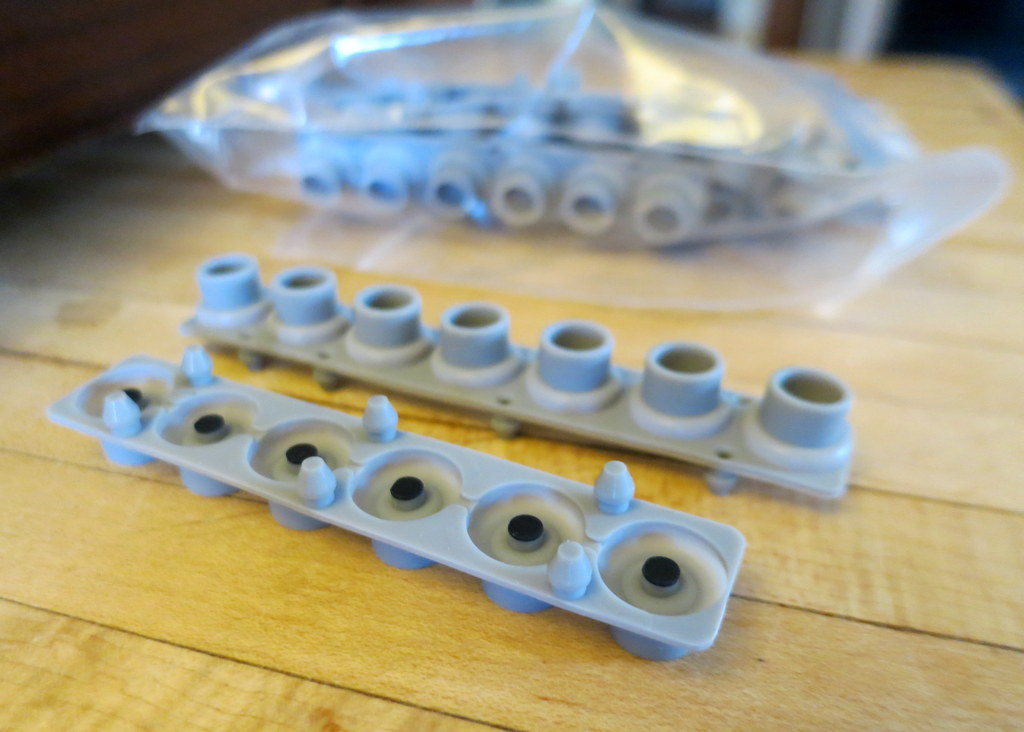
With the board cleaned, I got out the new key contacts and lined them up to make sure that I had the correct assortment -- they're not all the same and I was worried that I might not have been sent the right ones.  Luckily, LA Synth Co know what they are doing.  I had what I needed.  They lined up great and I attached them simply by pushing them on.

Getting ready to attach the new key contacts
The new key contacts are attached simply by pushing them on.

With the key contacts attached, I start putting the synth back together again.  First, I have to re-attach the key contact circuit board to the bottom of the keybed.  The only trick is getting the key contacts to fit inside their respective holes in the bottom of the keybed.  It isn't hard, but you do have to pay attention.

These are the holes on the bottom of the keybed into which the key contacts must fit. 

After getting the board onto the keybed and screwed together, I did a visual inspection and saw that one key contact wasn't seated correctly (as shown below).  So, I unscrewed the board and was more careful in putting them together.  The second time, all the key contacts were seated nicely.

Here, after assembly, one of the key contacts didn't seat correctly.  I simply took it apart and was more careful when I put it together again.

That's it!  The key contacts are done!  The only thing left to do is to put the synth back together again.  I have to put the keybed back in, screw it in, and screw the front panel back down.

Time to put everything back together again!

Fully re-assembled, I also to this as an opportunity to clean the keys and the front surface.  Looks great!

The re-assembly went easily.  I also used my rag and alcohol to clean the tops of the keys and the control panel.  She looks great now!

Plugging her in, they keys all work.  The joy!  Not only is it a joy to play an instrument that works, it's a real satisfaction to have fixed it myself.  Fixes don't really come any easier than this one.  Thanks LA Synth Co!

Wednesday, December 23, 2015

Arduino-Controlled OTA Overdrive

I'm really enjoying playing my OTA Overdrive Mod for my Polysix.  I also enjoy how simple it is -- I just added one resistor.  If I want a different amount of overdrive (or none), I swap in a different resistor.  So simple.  The question now, however, is how to make this mod be robust and usable day-to-day?  Well, today, I start that process.  My goals are to make it controllable from the front panel *and* to save and recall its setting with the Polysix's patch memory.  It's this second goal that makes this mod a little tricky.  Let's figure it out!  (Not surprisingly, my solution involves an Arduino...)

Controlling my OTA Overdrive with an Arduino and a Digipot.  

Why Not Use a Pot?  As I said, my OTA overdrive is controlled by changing resistors.  So, the easiest solution is to mount a potentiometer (a "pot") to the Polysix face, to wire it as a variable resistor, and to connect it to the correct spot in front of the OTA.  Fit with a nice knob, a pot is easy to use, simple to install, and inexpensive.  Sound great!  The main problems with using a traditional pot are that (a) I don't want to drill a hole in my Polysix to mount the pot and (b) a pot is not programmable, which means that its setting can't be saved and recalled with the overall synth patch.  I'd like to find a way to overcome both issues.

Using a Digipot as a Variable Resistor for my OTA Overdrive Mod

Use a Digital Potentiometer:  While a traditional pot isn't quite satisfactory, I think that a digital potentiometer (a "digipot") would work great.  I first used a digipot to add velocity sensitivity to my Polysix and I found it to be very useful.  A digipot is like a regular pot in that it can be used as a variable resistor, but a digipot has an advantage in that it can be controlled by digital messages sent from a microcontroller.  As a result, I can use buttons and knobs that already exist on the synth to control the overdrive.  And, in theory, I can even change the overdrive settings with each synth patch.

Control by an Arduino:  You don't get something for nothing, however.  To use a digipot, you need a microcontroller to drive it.  Microcontrollers are pretty easy to add...in fact, I've already added two to my Polysix: (1) an Arduino Mega acting as my key assigner and (2) a Teensy 3.1 acting as my velocity processor.  I could use either of these existing devices to control my digipot, but neither is conveniently located to the KLM-368 Effect PCB where the overdrive mod lives.  I hate running long wires carrying noise-spewing digital signals, so I think that I will add yet another microcontroller to my synth.  This time, it'll be something small like an Arduino Micro.

Block Diagram of my Solution

User Control:  While the Arduino can control the digipot, how will the user tell the Arduino what overdrive level is desired?  Since I don't want to drill a hole to add a new dedicated knob, I looked at my Polysix control panel with fresh eyes.  Which knobs ore buttons could I re-purpose?  My eyes fell upon the "Attenuator" knob.  For me, I never use the knob below 0 dB, which means that the whole left half of the knob is basically unused.  I could totally re-purpose part of that knob for adding overdrive.   No drilling necessary!  But how do I sense the Attenuator's setting?

Re-Using the "Attenuator" Knob to Be My Overdrive Control

Look for the Signal, not the Knob Itself:  The key innovation is that I should not try to sense the knob itself.  Instead, I should sense the signal that the Polysix CPU generates in response to the knob.  The reason to sense the signal instead of the knob is because of patch memory.  To enable patch memory (even when patch memory isn't being used), the Polysix CPU scans all of the knobs and switchs on the panel and then generates control signals in response to those settings.  Then, if a patch is recalled from patch memory, the CPU ignores the switches and knobs and generates the control signals based on memory.  If I am successful in having my Arduino listen to the signal generated by the Polysix CPU in response to the Attenuator knob, my overdrive setting will respond to both the knob and to the patch memroy system.  This is what I want!  But which signal in the Polysix corresponds to the Attenuator knob?

"P-Vol" is the Attenuator Knob:  Looking around the schematic, I found that the Attenuator setting corresponds to a signal called "P-Vol", which presumably stands for "programmable volume".  It turns out that P-Vol is a simple analog voltage signal.  Therefore, via its Analog Inputs, my Arduino can listen to this signal and engage (and increase) the overdrive whenever the Attenuator knob is turned below 0 dB.  Great.  The P-Vol signal is also available on the KLM-368 Effect PCB (at R188), which makes it convenient to the overdrive mod itself, which is likely where I'll mount the Arduino.

The "P-Vol" signal reflects the setting on the Attenuator knob.  I'll control the amount of overdrive by sensing the value of this signal.  I can read the P-Vol signal at R188 on the KLM-368 Effect PCB.

Interpreting P-Vol:  Attaching a wire to the upstream side of R188, I read the voltage using my digital multi-meter for various settings of the Attenuator knob.  As you can see in the graph below, it's a nice, simple, straight line.  I can use this data as part of a lookup table on my Arduino to determine whether to engage the overdrive (if knob is set to less than 0 dB) and how much overdrive to apply (a lower knob setting will engage more overdrive).  Via this lookup table, the Arduino will command the digipot to actually induce the overdrive that I want.  This plan is coming together nicely.

Data that I measured relating the "P-Vol" voltage at R188 to the Value of the Attenuator Knob

The Wiring Plan:  Now I have to figure out how to wire up all of the pieces to put this plan into action.  Luckily, I already figured out how to connect and use a AD5260 digipot.  This time, however, instead of using a full-size Arduino Uno,  I'll use an Arduino Micro.  The pin mapping is the same, so the connection plan is still valid.  The image below shows my plan for wiring it up.

Wiring the Arduino Micro to the AD5260 Digipot.  Lots of signals are needed from the Polysix, including +5V, -5V, Gnd, P-Vol.  These are in addition to the input and output audio signals that'll be manipulated by the digipot to overdrive the OTA.

Both +5V and -5V:  There is one important difference in this new plan: the digipot needs to be supplied with both +5V and -5V.  The -5V is new.  The reason that it needs a bi-polar power supply is that the audio signal that I'm attenuating is a bi-polar signal.  The audio signal from the synth could span +5V to -5V, therefore the power supplied of the digipot needs to span +5V to -5V.  Lucikly, the Polysix makes -5V, so I can grab that voltage rail from the synth.  I had to pull it from the Polysix's power supply PCB (not the KLM-368 Effects PCB), but that's not really a problem, just a bit messy.

Wiring it Up:  I wired up the Arduino and digipot onto a solderless breadboard, as shown in the picture at the top of this post.  I then tacked in a bunch of wires to the KLM-368 PCB and grabbed the +/-5V from the main power supply PCB.  As you can see below, it's quite a mess.  I usually find that messiness is part of the discovery and invention process.  Things always seem to get messier before they get simpler.

Trying new things is a messy, messy business.

Software:  After wiring up the hardware, I need to write software for the Arduino to listen to the P-Vol signal and to drive the digipot.  For the digipot, I simply re-used my previous software that I wrote to drive the AD5260.  Then, I added the logic to read the analog "P-Vol" signal and decide what resistance level to set in the digipot.  It was nothing complicated, though it did take some trial and error to find the right voltages at which to transition between resistance levels.  My code is shared here on Github.

Success!  After firing up the system, and after fixing a bunch of bugs in my software, I found that this Arduino-digipot solution does successfully control the amount of overdrive based on the Attenuator knob setting.  Success!  And, yes, it also correctly respond via patch memory changes.  Yay!  It feels so good when stuff works.

Issues:  This setup does have one small problem, however -- the lowest setting of the Attenuator knob (-10 dB) isn't detected by the Arduino.  The -8 dB setting and the -10 dB setting give the same behavior.  The problem should have been obvious earlier.  As shown earlier in my graph of voltage vs knob setting, note that both the -8 dB and -10 dB knob settings yield a P-Vol voltage that is negative.  The Arduino can't measure negative values.  To the Arduino, they both look like zero volts.  As a result, the Arduino can't tell the difference between the two knob settings.  I totally should have realized that earlier.  Bummer!

Next Step:  There are two easy solutions here: (1) shift the DC level of P-Vol with an op-amp prior to sending it to the Arduino's analog input, or (2) abandon P-Vol and, instead, sample the four digital signals that the Polysix uses to generate the P-Vol.  The latter approach definitely looks easier.  Next time, I'll give that a try instead.

Follow-Up:  I'm thinking about doing a custom PCB with the digipot and Arduino integrated together onto a single board.  To help me learn how to do that, I created my own breadboard Arduino from raw parts.  You can check it out here!

Follow-Up:  I've completed the PCB design.  It was actually pretty fun!  You can check out the story here.
Thursday, December 10, 2015

Polysix OTA Overdrive

I still chase my dream -- to get a decent electric piano feeling from my Korg Polysix.  Adding velocity sensitivity got me a long way there, but the sound itself needs to be dirtier, with more compression, more grit.  I tried adding diodes to the signal path to generate some distortion, but it sounded bad.  Too fizzy.  Now, I've modified my Polysix to overdrive one of its OTA circuits.  Having a soft onset that eventually leads to a deep, warm saturation, I think that it worked out pretty well!


OTA Overdrive:  After the failure of my experiment with diodes, I looked for other places in the Polysix circuit where I could generate distortion in other ways.  I noticed that the Polysix has a number of LM13600 chips, which are operational transconductance amplifiers, or OTAs.  Seeing them there reminded that a number of newer synths (e.g. Moog Sub Phatty) say that they offer "OTA Overdrive" as a means of user-controllable distortion.   I don't know how these synths overdrive their OTAs, but I was certainly game to figure out how to overdrive mine.

Pre-OTA Attenuation:  A key requirement of the LM13600 is that the input signals have to be very small.  If the inputs are too strong, the out signal will become distorted.  Since I want distortion, this looks like a good place to make my modifications.  Looking at the Polysix schematic, I see voltage dividers in front of every LM13600 to cut the signal down.  One example is shown below, which shows the elements around IC20.  The signal comes in on the right and exits on the left.  The voltage divider in front of IC20 is formed by R155 (10 kOhm) and R163 (100 ohm).  This cuts the input signal voltage by a factor of 100.  That's 40 dB of pre-OTA attenuation!

Adding a resistor in parallel to R155 reduces the attenuation prior to IC20 enabling the LM13600 OTA to be overdriven

Reducting the Pre-OTA Attenuation:  If I modify the circuit to have less pre-OTA attenuation (ie, to allow the signal to be stronger), I will likely overdrive this OTA.  I can easily reduce the attenuation by adding a resistor in parallel with R155, which will reduce the effect of the voltage divider.  For example, putting a 1 kOhm resistor in parallel to R155 will result in the signal being cut down by only a factor of 10, instead of the factor of 100.  This means that the signal is attenuated by only 20 dB instead of the 40 dB.  In effect, I'm slamming the OTA with a 20 dB stronger signal.  This seems like an easy path to overdriving IC20.  That's what I want.

Connecting the Resistor:  Looking inside the synth, I first looked for IC20 on the KLM-368 PCB.  I found R155 nearby.  To easily try different resistors in parallel to R155, I attached clip leads on either side of R155.  See the pics below.  I also attached my oscilloscope to C75 so that I could visualize the output as well as hear it.

Clipping in on either side of R155.
Adding a resistor, via the clip leads, to be in parallel with R155.

Trying a Range of Resistors:  As you saw in the video at the top of the post, I tried a range of different resistor values.  For gritty electric piano sounds, I liked the 3.3K and 1.1K values the best because the effect was subtle...it simply warmed up the signal and only added some grit when I played hard.  At the other end of the spectrum of resistor values (ie, when I shorted across R155), I unexpectedly enjoyed the unpredictable chaos of the heavily saturated distortion.  It was really fun!

Seeing the Effect:  The video demonstrated what this modification sounds like.  The figure below shows what it *looked* like.  The figure shows the output of IC20 for different resistor values across R155.  As you can see, with no resistor (which is the same as a very large resistor), the output signal is a nice sawtooth, but it is relatively small.  Then, as I add a large resistor (3.3 kOhm) the signal gets quite a bit stronger due to the extra gain.  As I make the resistor smaller (1.1 kOhm), the signal gets stronger.  Continuing to make the resistor stronger (500 ohm and on), the shape of the waveform starts to deviate from a sawtooth -- the top and bottom are becoming rounded.  This is signature of the OTA being overdriven.  It's a softer, more rounded, distortion than seen in my diode mod from my last post.  Finally, when I short across R155, the distortion becomes so heavy that the signal is a square wave.  Under certain contditions, as seen in the video, that can be cool in its own way.

Output of IC20 recorded for different resistors placed in parallel with R155. Note that decreasing resistance results in increased gain, which eventually leads to overdriving IC20, causing the sawtooth to become distorted.  Note that, for these images, I played two notes at the same pitch and waited for the two voices to naturally phase into alignment.

More Than Just Gain:  Clearly, the main effect of changing the resistor is to boost the level of the signal going into the OTA, which then overloads the OTA and causes the output signal to be distorted,  But, gain and distortion is not the resistor's only effect.  Looking back at the Polysix schematic, I see that R156 and C80 are also in parallel with R155.  This resistor and capacitor act to boost the treble frequencies.  By adding my own resistor around R155, I will also be reducing the effect of this treble boost.  So, maybe the "warmth" that I felt was actually a result of changing the frequency response, and not necessarily due to overdriving the OTA.  To confirm this theory, let's analyze the circuit for different resistor values and see what happens.

Circuit Simulation:  To simulate this part of the circuit, I used 5Spice Analysis, which is a SPICE-based circuit simulation program with a nice graphical interface for Windows.  Like most graphical versions of SPICE, you start by drawing the schematic of the circuit that you want to simulate.  The screenshot below shows the schematic that I made to represent the elements leading into the IC20 OTA.  For this simulation, the input signal is generated by "SigIn" on the right.  "TPv1" on the left represents the output signal, which would normally go to IC20.  In between the elements of the Polysix's voltage divider, the R-C treble boost, and my added overdrive-inducing resistor.  Now I can run the simulation and see the expected frequency response.

Using "5Spice Analysis" to model the frequency response of the pre-OTA voltage divider network.

Expected Response, Unmodified Polysix:  The graph below shows the modeled response of the circuit.  On the bottom (in blue) is the the circuit response with no added resistor around R155.  As expected, the signal is 40 dB down, which is what we expect based on the 10 kOhm / 100 Ohm voltage divider.  Also note, however, that the treble frequencies are boosted due to the effect of R156 and C80.  At 5 kHz, the signal is boosted by about 5 dB.  While not a huge boost, this would definitely sharpen the sound.

Expected Response of the pre-OTA voltage divider network.  The different lines show the effect of different values for the resistor that I placed in parallel to R155.
Expected Response, Modified Polysix:  When the parallel resistor is added, I get the black traces shown in the figure above.  The primary effect is that the signal level goes up.  The 1.1 kOhm case, for example, shows that the signal is at -20 dB instead of at -40 dB.  This is the 20 dB gain that I mentioned earlier.  A secondary effect of adding the parallel resistor, however, is that the boost to treble frequencies becomes much less.  Perhaps this is the increased "warmth" that I perceived.  Hmm.  I think that this requires a little more exploration.  Maybe there are additional modifications that I can make to shape the frequency response to make the OTA overdrive sound even better!

Next Step:  I liked the sound and feel of this OTA overdrive much more than the diode distortion.  I think that, if I can figure out how to make this OTA overdrive controllable from the Polysix's front panel, I'll enjoy having this modification.  So, that's my next step: figure out how to have a controllable amount of overdrive for IC20.  Stay tuned!

Follow-Up:  How to make this mod controllable without clipping in new resistors?  In this follow-up post, I start designing this mod to use an Arduino and a digipot.  

Monday, November 30, 2015

Polysix Drive - Diode Distortion

I recently modified my Korg Polysix to have velocity sensitivity.  Now that it is responsive to the dynamics in my playing, my Polysix makes much more convincing electric piano and clav sounds.  The problem, however, is that those classic EP and clav riffs from the classic records from the 70s were often played through a guitar amp, which means that we're used to hearing them with the warm compression and light overdrive of tube guitar amps.  By comparison, the EP and clav sounds from my Polysix are too clean and too dynamic.  In this post, I start the process of finding the right "drive" mod to bring some of that compression and overdrive to my Polysix.  I'm going to start with some simple diode-based distortion.

A simple distortion generator: an LED, or a diode, or both!

Classic Diode Distortion:  Being a guitarist, I know that it is very difficult to simulate the sound and feel of a tube amp.  So, instead of heading down that challenging path, I'll look to the well-known overdrive and distortion tricks used in guitar pedals.  A very common technique used for guitar distortion is to use a pair of opposite-facing diodes in parallel.  This is how distortion pedals such as the Ibanez Tubescreamer and the ProCo Rat achieve their classic sounds.  Maybe it'll work well in my Polysix, too!

Putting Diodes in the Polysix:  Below is an excerpt from the Polysix schematic.  It shows the last VCA and the last amplifier prior to the audio signal being sent to the output jack.  In the blue region, it shows that the make-up gain after the VCA is simply an op-amp configured as an inverting amplifier.  Since the Tubescreamer also uses an inverting op-amp, I chose to follow the Tubescreamer's distortion approach of adding a pair of diodes into the op-amp's feedback loop.  I just need to clip in a pair of diodes?  That's it?  Easy.

Schematic of the last VCA and last amplifier in the Polysix.  I've chosen this location to add my "Diode Distortion Mod", which is simply a pair of clipping diodes in the feedback loop of the last amplifier.

In Parallel with R196:  In the modified schematic above, you can see that the pair of diodes are added in parallel with the other elements in the feedback loop.  To enable a quick test, I simply attached the diodes using clip leads on either end of R196.  The other ends of the clip leads (not shown) are clipped onto the diodes.  The only tricky part is to make sure that the diodes face in opposite direction.  I used my handheld multi-meter to determine which direction was "forward" for each diode, and then I swapped one of them around backwards.

Using small clip leads to attach my diodes (not shown) in parallel with R196.

Looking at the Output:  With the diodes hooked up, I used my oscilloscope to look at how the diodes affected the audio signal from the op-amp.  The pictures below show some screenshots from the oscilloscope.  To make a strong signal, I set the Polysix to play two voices at the same pitch.  Then, I set the Polysix's "Attenuator" dial to maximum volume (ie, "+10dB").  Now the signal is strong enough to really show the effect of the diodes.

Screenshots of my oscilloscope when recording the output of the op-amp.
I tried different combinations of diodes in the op-amp's feedback loop.

Clipping of the Waveform:  As can be seen in the top-left screenshot ("No Mods"), I've got a normal-looking sawtooth waveform.  When I add just the LED, I see that the top of each sawtooth has been clipped to a maximum voltage of 1.6V (ie, the LED's forward voltage drop).  When I swap out the LED for a backwards silicon diode, it's the bottom of the sawtooth that has been limited (clipped at 0.6V, which is the diode's forward voltage drop).  Finally, when I have both the red LED with the backwards silicon diode in circuit, both the top and bottom of the waveform is clipped.  So, the diodes act to distort the signal by limiting its dynamic range.  Pretty sensible.

Demo:  OK, these oscilloscope views are interesting and all...but how does it SOUND?!?  That's a good question.  Below is a short demo that I pulled together.  It shows the baseline Polysix with no distortion mod, the Polysix with LED distortion only, and the Polysix with the LED + diode.


Not What I Wanted:  By the end, my conclusion was that I didn't like the results.  My first reaction was that the distortion was too fizzy/fuzzy.  But, beyond just the fizzy sound, the diode distortion didn't have the right feel when playing it.  I had been hoping that the distortion would provide a sense of dynamic compression, like a guitar amp feels.  But, instead of feeling that kind of compression, I actually felt like the signal was being hard limited...which, of course, is exactly what diodes do.  I should not have been surprised at this disappointment.

Moving Forward:  Yes, I could have spent more time refining this diode distortion modification to try to address my criticisms.  For example, to reduce the fizzy/fuzzy sound, the Tubescreamer includes additional capacitors to reduce the high frequency sizzle.  I could have tried that.  But, in truth, this experiment reminded me of why I don't use diode-based distortion pedals with my guitar...I never end up liking the sound.  So, for my Polysix, I'm going to leave behind the diodes and try some other approaches.  Let the synth hacking continue!

Update: I've removed the diode distortion and, instead, modded the Polysix to overdrive one of its OTAs.  I like that sound much better!

Sunday, November 8, 2015

Korg Polysix with Velocity Sensitivity

In truth, a Korg Polysix has rather limited features.  But, because it is an analog synth, it is open to modifications.  And so I've dived in head first.  I've already added aftertouch and portamento, controllable detuning, sustain pedal, and Moog-style legato triggering.  My most recent modifications began a few weeks ago, when I decided that I wanted my Polysix be velocity sensitive.  After a bunch of explorations and trials, I've finally pulled together all of the pieces.  That's today's story.  But first, here's a demo!  (Note, the bass distorts my laptop speakers, too.  Go for headphones.)


The Pieces:  The addition of velocity sensitivity to my Polysix builds upon many of the previous mods that I've done.  The core enabler of this mod was the fact that I had already replaced the stock Polysix keybed (which does not transmit velocity information) with a new Fatar keybed that is both velocity and aftertouch sensitive.  It's sweet.  As shown below, in my modified Polysix, the data from the new keybed is fed to an Arduino Mega, which assigns each new note to one of the six voices in the Polysix.  To modulate that voice in response to the note's velocity, I also feed the velocity information to my new "Velocity Processor", which then does the actual velocity-based modulation.

My highly-modified Polysix.  The newly-added "Velocity Processor" is highlighted in yellow.

Velocity-Based Modulation:  So what kind of velocity sensitivity did I implement?  I chose to modulate the intensity of the filter envelope.  As you heard in the demo, the intensity of the filter opening and closing gives a strong sense of articulation and dynamics.  In a stock Polysix, the intensity is the same for all voices (as set by the "EG Int" knob).  My goal was to dynamically change the envelope intensity based on how hard I hit the key.  As shown below, I chose to attenuate the filter envelope based on the note velocity.  At maximum velocity (MIDI 127), the envelope would be at its full intensity (as set by the "EG Int" knob, as before).  At lower velocity values, the intensity would be progressively smaller.  As a result, notes that I press hard should have a strong intensity and notes that I press lightly will soft intensity.


Scaling the VCF Envelope Based on the Note Velocity

Hardware Approach: After studying the Polysix schematic, and after figuring out how the VCF envelope multiplexing and how its associated addressing and synchronization works, I settled on the plan that I would manipulate the VCF envelopes in the multiplexed portion of its circuit.  Being multiplexed, I only have one signal line to manipulate, instead of six individual signals (one for each voice).  Sure, the signal on that one multiplexed line is changing very quickly (all six envelopes are time-sliced onto a single line), but I've already proved that a Teensy 3.1 plus a digital potentiometer can keep up just fine.  So, my hardware plan was settled -- I'd insert my Velcoity Processor right after the VCF Multiplexer (IC24) on the Polysix's KLM-366 PCB.


Building It:  In the Polysix, I was happy to see that IC24 is socketed, which means that you can pull out the chip and insert all sorts of fun new circuitry via the now-empty socket.  And so that's exactly what I did.  I took a piece of protoboard, soldered on the Teensy 3.1, the digipot, and IC24 itself.  More details on the build are here.  I then inserted the assembled protoboard into the empty IC24 socket.  As you can see below, it's not too pretty.  It's not complicated, it's just messy.  Someone with more experience would certainly do this more cleanly.

My "Velocity Processor" Installed in my Polysix.  Lots of wires.  Someone smarter than me could surely do it more cleanly.

Arduino and Teensy Software:  Hardware alone does not make this modification work.  I also needed to write some software.  For example, I needed to program the Teensy (my "Velocity Processor") to keep up with the multiplexing circuitry and to drive the digipot to properly attenuate the envelope signal.  I also needed to expand the programming on the Arduino Mega (my replacement for the Polysix's "Key Assigner CPU") to properly route the velocity data from the keybed to the Velocity Processor.  While this routing of the velocity data sounds straight-forward, the need to support the Arpeggitor modes made it more challenging (note that the velocity-sensitive arpeggiator leads to fun effects, like being able to make some notes feel accented...definitely a cool effect).  In the end, the software writing went pretty smoothly.  My latest code for both the Arduino and the Teensy are on my GitHub here.

First Trials and Tweaking:  Once I got it all wired up and programmed, I started to play it.  The velocity sensitivity really makes it more expressive.  Velocity sensitivity also quickly exposes bad keyboard technique!  I need practice!  But, even with my poor technique, I felt that the velocity response wasn't quite right.  So, I spent some time remapping the velocity values to create a custom response curve.  Furthermore, to get a good electric piano/clav sound, I felt that I needed a little grit and compression in the sound.  So, I added a drive circuit, which will be the subject of another post.

Playing It:  Once I got it adjusted to my liking, I've had a lot of fun adjusting all of my traditional Polysix patches to best include the velocity capability.  I started with the piano and clav sounds (as seen at the top of this post) because they our ears most expect velocity dynamics with these kinds of sound.  Interestingly, though, even organ sounds (which are traditionally not velocity sensitive) can benefit from velocity dynamics.  Hitting the keys a little harder, gives the organ more "pop!".  You can here it this little carnie organ vamp:


Moving Forward:  My next step is to continue to refine the interaction of the velocity with the other synth's features.  For example, I'd like a way to turn off the velocity sensitivity so that the EG Int will work as it does in a stock Polysix.  To do this, I simply need to wire up a switch, or re-purpose one of the switches already on the back of the synth.  Also, I need to further tweak (and then write-up!) my drive circuit.  It is critical for the velocity-sensitive piano/clav sounds, but I've found fun uses with other sounds, too.  Finally, I also want to improve how the velocity interacts with the Unison and Chord Mem modes of the synth.  It doesn't feel quite right yet.  So there's lot's to do!  But first, I've got some playing to do.  :)

Update: I tried adding diode-based distortion to add some grit to my EP/clav sounds...but I didn't like it very mcuh.

Update: I tried overdriving one of the Polysix's OTAs to add some grit and I liked it a lot!

Thursday, October 29, 2015

Building my Polysix Velocity Processor

Today it starts.  We've talked enough about my dreamy dreams of velocity sensitivity for my Korg Polysix.  It's time to get down to business.  It's time to apply what I've learned about its multiplexing and about its synchronization.  It's time to build something.  Let's smell the solder!

First Generation "Velocity Processor" Installed in my Polysix

Where to Insert My Circuity:  Before I solder anything, I need to figure out where I am going to insert my "Velocity Processor" into the Polysix circuit.  As discussed in my previous post, I want to put it after the multiplexer (IC24) but before any of the other envelope and VCF processing.  The figure below shows, notionally, how I'll use several of the signals associated with IC24.  What is the easiest way to get physically access to these signals?


Use the IC24's Socket!  When I opened up my Polysix and too a look at IC24 to see what connection points might be available, I was immediately struck by the fact that IC24 is socketed!  By pulling IC24 out of its socket, I now have instant, easy, and easily-reversible access to most of the signals that I need!

Here is the socket for IC24.  The perfect place for inserting my Velocity Processor.

Which Holes for Which Signals:  Looking at the Polysix schematic, I see that I can get almost all of my signals from this one socket: +5V power and ground, the three addressing lines (A,B,C), the inhibit line (INH) as well as a place to inject my velocity-modified, multiplexed envelope signal.

The signals that I will use for my Velocity Processor -- all available from the socket for IC24.

How to Connect to the Socket:  While the socket is a very convenient way to get signals without modifying the Polysix PCB, I still had to find the right hardware that would mate into the socket.  After trying a few options, I found that the legs on the Arduino-style "stackable" headers fit very nicely into the socket.  My plan, therefore, would be to mount the stackable headers to a protoboard, solder them in place, and have their legs reach down and mate to the socket.  Since these stackable headers have really long legs, they'll let the protoboard (with all of my other components) stand above the other components on the Polysix PCB.  It'll be great!

Arduino-style "stackable" headers fit into the Polysix IC sockets.

Why Not Use Regular 0.1" Pins?  Arduino fans may immediately wonder why I'm using these stackable headers when it appears that 0.1" male pins (also popular with Arduino projects) would be cheaper and less bulky.  In fact, I did try to use these pins.  But they don't fit in the socket.  After looking at the detailed geometry of these pins versus the legs on the stackable header (shown below), I found that the pins are indeed thicker than the legs on the stackable header (0.64 mm vs 0.40 mm).  That's the reason that the pins don't fit.  That's the reason I'm using these stackable headers.  [Note: If you really want to use pins, perhaps the 0.45 mm pins of the Samtech TS-108-T-A will work.]

The common 0.1" male pins are too thick to fit. But pins the stackable female headers are thin enough to work.

General Configuration:  After looking at the space inside the Polysix, and after looking at the size of the protoboard that I had on-hand, I decided to configure the basic elements of my Velocity Processor as shown below.  The stackable headers are shown on the bottom right.  The digipot is on the left.  The Teensy 3.1 microcontroller is on the top.  Now we just need to figure out the wiring.

Here is my high-level plan: a Teensy 3.1 plus a digipot plus a pair of stackable headers.

Connections to the Teensy:  Below is a picture of the Teensy with the pins labeled.  It shows which pins I'm going to use for the various connections.  Remember that the Teensy is only a 3.3V device whereas the Polysix's digital signals (the A,B,C addressing lines and the inhibit line) and the Serial connection from my Arduino key Assigner are all 5V signals.  Luckily the pins on the Teensy 3.1 are 5V tolerant, so I can attach those lines to the Teensy without damaging it.  Another side-effect of the Teensy being 3.3V is that its SPI connections to the digipot will also be 3.3V signals.  Therefore, the digipot will have to be provided with a 3.3V reference, which will come from the wire that I show attached to the Teensy's 3.3V supply.

Connections to my Teensy 3.1

Connections to the Digipot:  Below is a figure showing connections that I'm making to the pins of my digipot.  As mentioned above, the SPI logic signals are at 3.3V, so I connect the "VL" logic reference (pin 12) as well as to the other logic pins.  The multiplexed envelope signal (my "input" to the digipot), however, can span 0V to 5V.  Therefore I set VDD to +5V and VSS to ground.

Connections for the Digipot to handle the 0V-5V Multiplexed Envelope Signal

The Wiring Plan:  The figure below shows my wiring plan for the Teensy, digipot, and IC24 socket.  Of course, I still need IC24 itself to function within the circuit.  Therefore, I had the brilliant idea to insert another IC socket into the stackable headers!  Isn't that brilliant!?!  I happened to have a spare IC socket whose legs seemed just long enough to fit in the big holes of the stackable header.  So, I can build my velocity processor as shown below, insert the board into the vacated socket for IC24, and then stick IC24 into my board.  That's the plan, at least.

The First Wiring Diagram for my Velocity Processor.  Note IC24 sitting on top of the stackable headers in the bottom right.

The Wiring Reality:  Below, you can see the protoboard after I wired and soldered everything in place.  You can even see how I inserted IC24 in place.  On the underside of the board, you can see the pins sticking out that will fit into the Polysix's socket for IC24.

The first version of my Velocity Processor

Testing It:  At the top of this blog post is a picture of this first version of my Velocity Processor mounted within my Polysix.  While it did do something, I quickly discovered that my plan of sticking IC24 on top of the stackable headers wasn't working.  The pins of my add-on IC socket did not mate securely nor reliably to the stackable header.  Sad.

The New Wiring Plan:  The solution to this problem was to move IC24 off the stackable headers and down onto the protoboard.  I had resisted doing this because it mean adding 16 wires (one for each leg of IC24) between the stackable headers and the new spot for IC24.  It was going to be an annoying task, but I needed to do it.  <Sigh>

The Second Wiring Diagram for my Velocity Processor.  Note that IC24 has been moved and 16 additional wires have been added to connect it to the circuit.

The Completed Wiring:  Below is a picture of my Velocity Processor after moving IC24.  You can see it on the top right.  You can also see the rainbow of wires that I had to add to connect IC24 back to the stackable headers.  All those extra wires sure made it ugly.  But, the task is done.

By moving IC24 to its own spot on the top right, the extra wiring really made it ugly.

Plugging It In:  Below is a picture of my revised Velocity Processor mounted within my Polysix.  All of the signals that it needs come up through the IC24 socket into which it has been mounted.  The only exception is the serial communication signal that comes from my Arduino Key Assigner.  That simplicity is pretty nice.

My revised "Velocity Processor" installed in my Polysix. 

Next Steps:   I need to finish the software on the Velocity Processor and I need to write the companion software for the Arduino Key Assigner so that it conveys the velocity data from the keybed to the Teensy.  Then I can test it and make sweet, sweet music.  Stay tuned!

Update:  It lives!  Check out the demo here.